Is Your Website Running on PHP? Critical PHP Security Vulnerabilities Put Business Websites at Risk

🚨 Critical PHP Security Alert: Is Your Business Website Protected?
If your website runs on WordPress, WooCommerce, Drupal, Magento, or custom PHP code, there is an important security issue you need to know about.
On October 21, 2026, emergency security patches were announced for two critical PHP vulnerabilities known as PHP2Shell (CVE-2026-109618 and CVE-2026-109619).
These vulnerabilities could allow attackers to execute malicious code remotely on vulnerable servers without logging in first.
But what does this mean for your business website?
First, what is PHP?
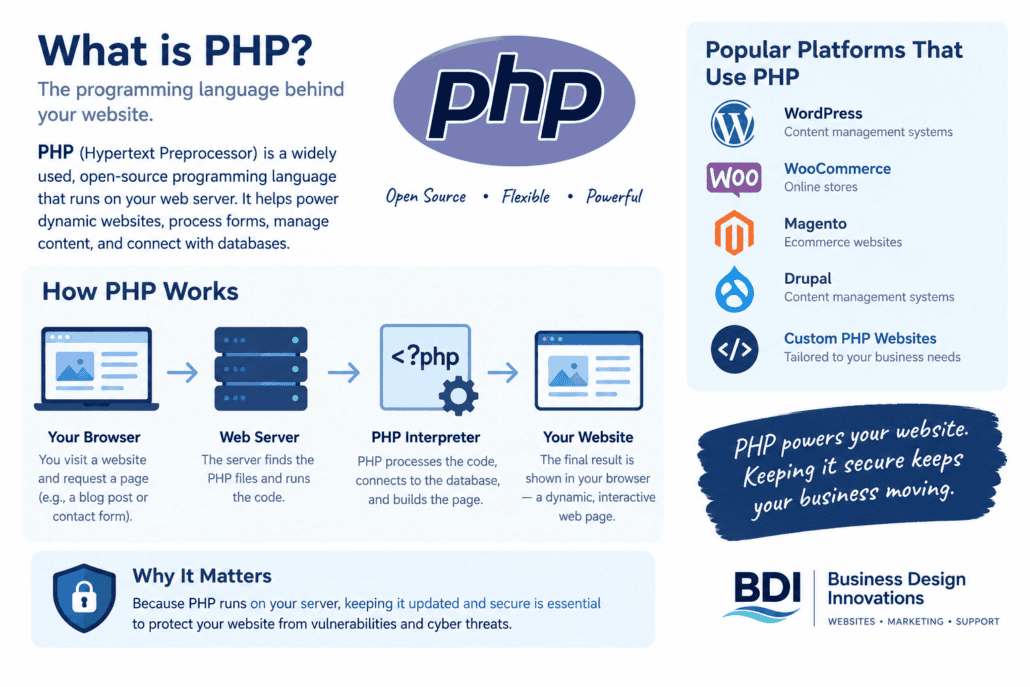
PHP is a programming language used to run websites and applications on a server. WordPress relies heavily on PHP to load pages, process forms, manage content, and support plugins and themes.
Think of your website as a house. Your website design is what visitors see, while PHP helps run many of the systems behind the scenes.
If the underlying software has a serious security flaw, your website might look completely normal while the server running it remains vulnerable.
Who needs to pay attention?
Businesses running:
• WordPress websites
• WooCommerce online stores
• Magento or Drupal websites
• Custom PHP applications
• Older websites using unsupported PHP versions
The risk depends on the server environment, the version in use, and whether the appropriate security fixes have been applied. Not every PHP website is automatically vulnerable.
What makes PHP2Shell concerning?
Remote code execution means an attacker might be able to run commands on an affected server by exploiting a software vulnerability.
Depending on the environment and level of access gained, a successful attack could lead to unauthorized access, exposed data, malicious files, or website disruption.
A security patch is not something to put off until your next routine website update.
How do you fix the problem?
Here are the steps business owners should take.
1. Check your PHP version and patch status.
Ask your hosting provider or developer which PHP runtime your website uses and whether the specific security fixes have been installed.
The initial fixed releases listed in security advisories are PHP 8.5.12, 8.4.27, 8.3.36, and 8.2.35.
PHP 8.1 and older versions are end-of-life. Some hosting providers backport security fixes to older builds, so confirm the actual patch status rather than relying on the version number alone.
Official PHP website: https://www.php.net/
2. Update the server environment, not only WordPress.
Updating WordPress core, plugins, and themes is important, but those updates do not automatically patch the PHP interpreter running on your server.
Your hosting provider or server administrator needs to address the PHP environment itself.
3. Check older plugins, themes, and custom code.
A PHP upgrade might expose compatibility problems in older website components. Test your forms, checkout, login, integrations, and other important functions after updates.
Older websites might need code remediation before they work properly with a supported PHP release.
4. Review backups and security controls.
Maintain a recent backup and confirm you know how to restore your website. A web application firewall, access controls, server monitoring, and security logs provide additional protection, but they do not replace the required patch.
If your website was exposed before the fix was installed, ask your hosting provider to investigate suspicious activity.
5. Make website maintenance part of your regular routine.
Security problems are one reason website maintenance matters. Outdated software, neglected backups, broken forms, and unsupported components create avoidable technical risks.
I wrote more about this here:
Why Website Security & Regular Updates Matter for Your Small Business
https://businessdesigninnovations.com/2025/08/why-website-security-regular-updates-matter-for-your-small-business/
You can also learn about ongoing website maintenance and support here:
Website Care Plans
https://businessdesigninnovations.com/web-care-packages/
What if your website needs more than a security update?
Sometimes an older website needs technical troubleshooting, code updates, performance improvements, or a larger upgrade.
My website design and development services cover website improvements and technical support:
For more practical website and marketing tips, visit the BDI Growth Hub:
https://businessdesigninnovations.com/growth-hub
Not sure whether your website is running a secure PHP version?
At Business Design Innovations, I help business owners identify website issues, review technical priorities, and plan website updates without the confusing jargon.
I offer a free website consultation to discuss your concerns and identify the next steps.
Start here: https://businessdesigninnovations.com/#contact
Business Design Innovations
Website Design, Maintenance & Technical Support
949-795-4721
info@businessdesigninnovations.com
Your website is an important business asset. Make sure the technology behind it receives the attention it needs.
Want a secure site that also ranks on Google and AI search?
See our transparent local SEO and website plans, starting at $199/month. Or get a free website and local market analysis first.